Friday, 18 January 2019

Week 1

For the first week our group focused on selecting a brief, selecting individual roles, coming up with ideas and understanding the brand of our selected brief.

For selecting a brief, we knew we wanted something fairly open, fun and potentially more artistically oriented. After looking through all the potential briefs we decided that the John Lewis and Partners brief best suited this and held the most interest for us. For the roles of the group, I was selected as the groups director and character designer, as I wanted to to try having a more leading role and I have a specific interest in character design. Ava decided to work on storyboards and scripting while Rhys is focusing on backgrounds and other smaller tasks.

To better understand our brief, we decided to visit a local John Lewis department store in the hopes that we could be inspired by their products, clientele, ethos and store branding. We quickly understood that John Lewis focuses on a high end feel, with high quality merchandise and expensive looking interior. We particularly gravitated towards their gifting section as not only was this highlighted in the brief, but we loved the look and variety of the wrapping paper and gift bags. We felt that this could be a really interesting aspect to incorporate into our project.

Finally we had a meeting to discuss initial ideas for the project, with us all agreeing that we really wanted to incorporate time and the seasons to fit in with the idea with 'giving though out the year' as well as the idea of experiences and memories.


Tuesday, 8 January 2019

Evaluation 503


During this project I have learnt a lot about what it takes to work as part of a group and the benefits as well as struggles that come with it. I defiantly enjoyed working as part of a group, as it meant that I was able to focus more on parts of the project that I liked and could spend more time on perfecting certain aspects. I also enjoyed having someone act as a director, as it meant that someone was keeping check on my progress and pointing out errors or things that could be corrected. This was useful as it helped me notice things that I may not have noticed myself and find new ways to improve. I felt our director did an excellent job of handling the project as a whole and keeping communications up, as well as making sure assets were organised. However, there were times where they could have been more assertive and given the team more guidance.

I feel that as the leading character designer on this project I created some strong and interesting characters that worked well for our animation. When creating the characters, I wanted to make sure it was something everyone was happy with and could draw fairly easily. In the meetings for the character design, I felt that our group communicated well and I made sure to take notes on what people liked and what they felt could be improved. I believe the colours and textures I selected for the characters worked well with the style we were working with while still standing out against the background. This experience defiantly helped me improve my ability as a character designer and learn about the kind of role a character designer plays within a group.

However, I feel that there were times where I took on more work than I could handle on my own. For example, we decided that to try and keep the style consistent I would draw all of the initial sketch layers since I designed the characters. This meant that I was very stretched for time and did a lot more animation then some of the other members of my team. I do however feel that this did indeed keep things more consistent but I now understand that it would have been better for me to assert myself and insist on spreading out the workload more.

When it came to communication within the group, I believe that overall it was fairly strong. Although there were times where our communication could have been better, for example there were many times where a certain member of our group wouldn’t show up to peer review sessions so we would have to do our best to relay the information given. This improved later on into the project and as such communications improved.

Overall, I feel like this was a successful group project and we have a finished animation that we are all happy with as a whole. Next time I am in a group for a project, I would like to try taking more of a leading role, but I have also learned from this experience that it’s better to play to people’s strengths and to share the workload equally.


Study Task 3 - Animation On A Physical Set Process

The Apple 2018 Christmas advert Share Your Gifts shares similar aspects the our group project as it shows examples of animation on top of a physical set. While this advert uses 3D animation and our groups uses 2D, the process is still relatively similar.
 The Making of Share Your Gift video shows the set for the advert being build and how they used 3D animation to create characters that could interact with the world. With the set, after building everything they filmed different scenes without the characters. This required careful planning as they had to have a strong understanding of how the characters will move in the frames and what they will interact with. This could be seen as a limitation of this type of animation as it can become difficult reshooting shots if the set is no longer standing or has been moved around.

However, a strength of this type of animation is that you can give the backgrounds a realistic and human built feel to them that can be difficult to accomplish with a digital set. It could also be argued that once the background scenes have been shot, there is a set lighting origin point so its easier to keep track of rather then having to remember where it would be in a digital set.

Animation Studied - Sharing Your Gift (2018) by Apple

Saturday, 5 January 2019

Study Task 3 - 2D Animation Aesthetic

2D Animation offers an extensive range of aesthetics and styles that can be applied in various unique ways. In animations such as Afternoon Class this varied use of 2D animation can be seen at different points of the short film.
At the beginning of the animation, it uses a very artsy and lineless style that creates an interesting effect, The use of colour palettes is also creative and works well with this style to help highlight aspects of the shot such as the protagonist, who has a brighter colour scheme than the rest of the characters in shot. These types of aesthetics work well with the 2D animation medium and would not create the same effect with other mediums such as 3D.
The style then changes later in the short to a more intense colour palette with a line based style with limited colouring. This blend of styles is best used in 2D animation as it keeps costs down as well as allows the animator to stick with minimal amounts of software, instead of having the use multiple different software.

However, due to the use of perspective in different shots, using only 2D animation can have its limitations as it can become difficult to understand how things look from different perspectives in a 2D format. This is where using other mediums such as 3D animation would be beneficial.

Animation Studied - Afternoon Class (2014) by Osro

Week 11

This week I completed the remaining scenes that needed to be coloured meaning my work on the group animation is pretty much finished.

Some of these final scenes were more difficult to colour/add texture to as some of the lined layers were somewhat messy and in some scenes had lines missing. This meant that I had to be extra careful as well as having to add lines in myself.

Overall I think the colouring/texturing has gone well and will look nice in the final animation.

For the remaining time we have on this module I will be finishing my part of the digital production journal, writing the evaluation and getting everything ready for submission

Friday, 21 December 2018

Week 10


This week I continued colouring the completed lined layers for our animation. Here are some examples of the pieces I have finished which will now have shadows and lighting added to them by Iago.


Through this colouring process I have learned that using textures may give the animation a nice look, but it comes with its own complications. For example, static scenes are more easy to add textures into while scenes with a lot of movement take much longer.

Because we also decided to add boiling to our animation it means scenes take even longer to add textures to and require extra care. 

Next week I will continue to colour completed lined scenes

Friday, 14 December 2018

Week 9

This week I finished off the remaining sketch layers for the animation and began the colouring of the completed lined layers. 
We also had our final weekly peer review where we presented the class with a rough final cut of our animation. We were told to take some frames out of certain scenes to speed up the motion (such as the frog eating wisp scene) and to make the credits clearer and easier to read.

Here is an example of one of the scenes that I have finished colouring of the figure rummaging through the chest.

Next week I plan to continue colouring the scenes that have been lined.

Friday, 7 December 2018

Week 8

This week I continued creating sketch layers for our animation. Most of the sketch layers are now done with around 5 more that need completing. Here is an example of one of the completed sketch layers which shows the two gems combining and opening the portal.

We also took note on suggestions made by our peers at the weekly review and have edited the frog and wisp sketch so that it is more clear that the wisp goes in front of the frog.

I also spend part of the week assisting Emma with creating sounds (frog croaks, portal noise) and ambient noises (wind, leaves crunching) for the animation. Emma then edited these sounds (I listened in and made suggestions) together to create a variety of new sounds which we hope to show in the next weekly.

Friday, 30 November 2018

Weekly 7

This week I have been continuing to create sketch layers for our groups animation, as well as testing the colours and textures within the animation.

So far 6 scenes have been sketched out and are ready for clean line layers which will be done by other members of the group. These have mostly gone well with some adjustments needing to be made to the timing and the walk cycles.


The video to the left also shows what the animation will look like once it has been clean lined and coloured. This clip however does not yet show lighting and shadows for the characters and also requires some adjustment to the wisp's speed and the ordering of the layers.

Overall this has been a productive week and for next week my task is continue the sketch layers.

Friday, 23 November 2018

Week 6

This week I have been working on creating the base sketch layers for our animation. So far I have completed the figure walking through the woods and the sleeping frog sketch layers. 

For the hooded figure I decided ti make them rather bouncy and their movements quite smooth and flows well. The wisp is very energetic so moves quite fast at times and doesn't stand still for long. While the frog is sleepy and so has slow and sluggish movements, matching that of a real frog/toad.

I feel that these have turned out well and give a clear idea to the movement and sizes of the characters. They should act as good bases when it comes to creating the clean line layer.

Next week I will be continuing with creating sketch laters using the finished backgrounds.

Saturday, 17 November 2018

Study Task 2 - Lip Sync

Here I have created a short lip sync animation based on given audio clips.

I found this task quite difficult as the audio clip I selected and some parts where it spoke very fast making it difficult to match up the animation. I also struggled with words that used 'tion' as I found it especially difficult to get the timing right.

However I feel that the beginning of the lip sync came out really nicely as well as a few other select parts. Overall I feel that I need more practice with lip sync and should probably practice with easier audio clips that don't speak as fast.

Friday, 16 November 2018

Week 5


This week me and Emma took some test pictures for our animations background to see what kind of lighting we felt worked best, as well as camera/lighting angles and shadows.

Unfortunately we planned to have the finalised pictures taken today but the cameras battery that we were using ran out so we were unable to do this. Next we will double check that we have a full camera battery to avoid this in the future.

I feel that we made a lot of progress this week and will be ready to start the animation next week.

Sunday, 11 November 2018

Week 4

This week I have been completing the character dynamics boards for our project. I think these have turned out well and show a range of different emotions and movements for the different characters. However, because of the limited movement we are including within our animation, I do feel that some of the movement in the boards is rather limited. In future projects, I would like to be able to work with more complex movements and dynamic motion.
My next part of the project is to start working on the sketch layer for the animation.

Friday, 2 November 2018

Week 3


For this week I was asked to complete the character turnaround sheets and test the use of water colour textures for these character designs. As you can see, I decided that this water colour style worked with the cloaked figure and frog designs, and confirmed the style and colour palettes with my team. However, after testing the water colour style with the wisp, it was decided that it would be best to stick to a more digital style, as the design looked off and we were unable to create the colour we wanted to use. For the next step of the project, I will be focusing on creating the second lot of character boards with the dynamic poses.

Friday, 26 October 2018

Week 2

 This week I was tasked with finalising the base character designs and working on testing colour schemes. After discussing the overall colour schemes with Emma and deciding on autumnal colours i chose to work with slightly darker colours such as browns and greys, with some yellows. I also conducted base tests on implementing a watercolour texture after everyone in our group agreed it could work well with a physical background. 

After sharing these boards with the group everyone was happy with the designs and agreed that a watercolour style worked well with them. For the cloaked figure we wanted to use the grey cloak (possibly testing a darker grey) as to not clash with the background too much, and for the frog we decided on the deep green and blue design. For the wisp we were set on using blue from the beginning so I stuck with this and messed with the shades as well as possible styles. The group really liked the painted style but this will need testing to see how it will work with the background.

Friday, 19 October 2018

Week 1


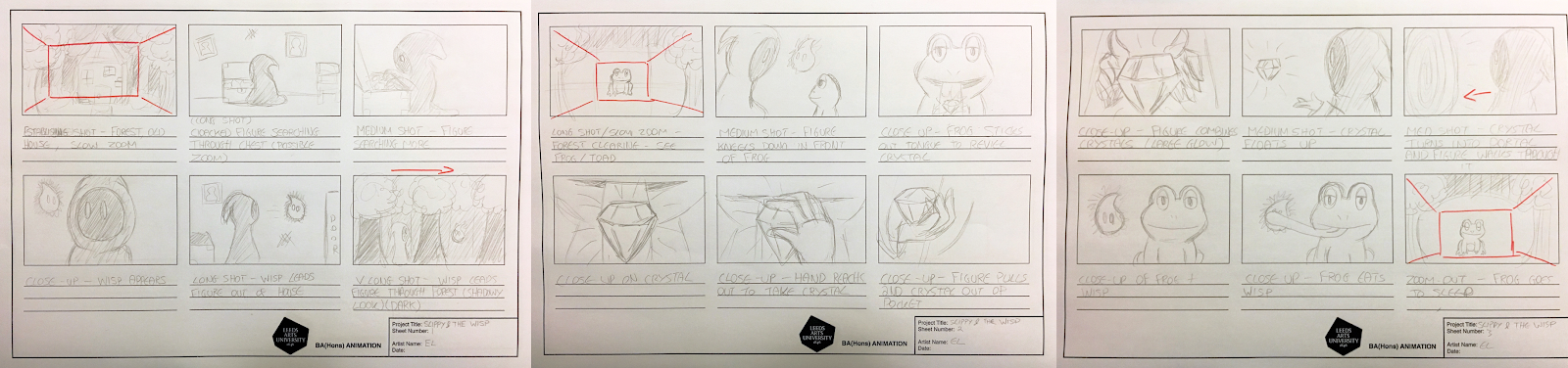
This week each member of our group was asked to create an initial storyboard for our narrative so we could see how everyone visualised it. This allowed us to discuss which ideas we liked best and what aspects would work within the animation. Emma and I compared our storyboards and worked out what we wanted to put in the finalised storyboard (Iago had not completed his).


I also began working on character concept designs as instructed, and discussed within our group what designs we liked and worked well together. My aim for next week is the have basic designs finalised and start looking into colour schemes and styles.

Monday, 14 May 2018

LAUAN404 EVALUATION

At the start of this module I began investigating the various potential characters as well as making sure I understood what the brief was asking for. Having already been familiar with the Beano I was very excited to begin working on this task. This lead to me selecting the character Billy the Cat as I felt that I could make the most exciting and likeable character with this base that would be appropriate for the target audience.

 I feel that the design process for this character went particularly well and was one of my strengths within this module, as I believe that my design and colour choices worked well with the brief and appealed to the target audience (based of feedback from that age group), as well as my peers and tutors giving me positive feedback. I also believe that I learnt a lot through this process about dynamic poses and silhouettes for characters. I found creating the silhouettes to be quite difficult for my character as the design was bulky in some areas which made the design look less clean in areas.

One of the things I struggled with the most in this module was using Photoshop to animate more complex scenes. This was due to me not understand other software enough to feel confident using them and having problems with certain aspects within Photoshop (lack of smoothing tool and creating new layers when pasting). I solved most of these issues through rotoscoping, drawing within a separate software and taking advantage of Premiere pro. However, this has helped me learn that it is important to improve my understanding and skills within other programs to avoid this in the future. I also struggled with creating the armatures as my character was predominantly white which make it look dirty easily. When it came to creating a walk cycle with these armatures, I realized that my armatures legs were not the same length and did not bend easily, meaning I wasn’t able to create a walk cycle with my armature and had to use one of my peers’.

I believe that this was a very useful module that helped me learn more about various processes, as well as encouraging me to put my work out there and get feedback from others. I also really enjoyed this module as it was predominantly based around character design which is an area of the industry that I am particularly interested in, and this brief helped me learn more about it and how it should be presented within the industry.

Overall, I feel that I pushed myself a lot more within this module and stayed on top of my work quite well which helped me get everything done in time to a good level. I’m excited to learn more next year and continue improving my abilities with all the new information and skills I have learned through this module.

Saturday, 12 May 2018

Billy The Cat Complete Animation


Here I have my finished animation for my character Billy the Cat. The story shows Billy hanging out with her friends when an announcement comes through the radio about a robbery at the bank. Billy springs into action and changes into her hero costume before jumping across rooftops and catching the robber. Overall, I feel like this was a successful piece with a variety of dynamic animations that help bring the character to life while still catering to the target audience.

Thursday, 10 May 2018

Throw and Ending Pose


Here I have finished animating some more dynamic scene for my animation. The first is my character Billy throwing a fidget spinner, which will be added in with Premiere Pro so I can better control the rotation and scaling speed. I feel that this scene turned out really well and smooth.

The second scene is the ending pose my character does at the end of the animation to celebrate catching the shady guy. I feel that this also turned out really well and looks clean and well shaded.

Monday, 7 May 2018

Parkour Landing Complete


Here I have completed the rotoscope parkour roll landing for my animation. I feel that this is a successful piece that looks smooth, clean and is correctly proportioned. This will act as the main action shot within my animation.

Saturday, 5 May 2018

Peer Review Feedback

Here are a list of notes I received during my feedback session:

- Walk cycle works
- Style very good
- Good timing
- Roll rotoscope looks good
- Animation looks very clean so far
- Motion lines and stills can be used to cheat animation
- Make sure i'm working in correct aspect ratio

This feedback has been very useful and will help guide me in completing my animation.

Tuesday, 1 May 2018

Animation Rough Cut 1 (1/2)

Here is a rough first cut for the first part of the animation. This shows a basic idea of what the title card will look like and has the characters animated without voice overs. I feel that this is looking good so far but would like to create more dynamic movement in the second half of my animation.

Monday, 30 April 2018

Billy Run Cycle and Parkour Landing

Here I have created a run cycle for my character Billy the Cat to use in my animation. This will appear in the title card or credits with a black background to make the colour stand out. I think this is a successful run cycle that has good energy to match the character.
I have also created a rotorscope of a parkour style landing to implement within my animation. This is a rough based to be drawn over but it demonstrates the movement and rough proportion sizes.

Saturday, 28 April 2018

Walk Cycles

Here I have created two short walk cycles, a 2D one and a 3D one. The 3D one is using a puppet to create the walk cycle. I initially intended to use my own puppet, however the legs were not the same length and did not bend very well, making it too difficult to create a walk cycle with. Instead me and Petra shared her puppet to create this walk cycle which I feel was very successful.


Here I have my 2D walk cycle of a person walking. I feel that the movement is smooth and it works as a walk cycle. However, I would have liked to put more time into creating a face for the character, rather then having a simple head. 

Sunday, 18 March 2018

Week 9 (Animatic and Evidence Video)

Here I have finished my animatic for submission as well as my creative process video which shows my sketchbook.

Overall, I'm really happy with how these have turned out. However, I would have liked to add more animated parts to my animatic had I managed my time better.

Friday, 9 March 2018

Week 8 (Animatic)

This week I began working on my animatic. For this I used my storyboards as outline bases to then draw over in Photoshop. This allowed me to work with layers which can then be placed in Premier while retaining these layers. This makes animating the sequence much easier.

I also created a test animatic using the initial storyboards to figure out the timing of different images and play around with sound effects.


Friday, 2 March 2018

Week 7 (Storyboards)

For this week I began working on creating a storyboard that I will later use to create a short animatic.  The storyboard follows my character Billy after the Beano bank is robbed and she goes out to catch the criminal.

I think this is a good and clear storyboard that shows the flow of the narrative, and will be useful for me when contracting the animatic.


Friday, 23 February 2018

Week 6 (Character Boards)


This week I completed my three art boards for my Billy The Cat revamped character. The boards show a turnaround, dynamic poses, silhouettes, other characters, expressions, a logo and a tagline.

I think these all turned out well and I am happy with the characters I have created.


Friday, 16 February 2018

Week 5 (Character Modelling)

This week I completed my character model based on my character designs for Billy the Cat.

Overall, I believe this task was successful in imposing my understanding of character modelling and I created an armature that reflected the look of my character and was fully moveable.

To improve next time I would focus more on the proportioning of the character when creating the inner wire structure as certain aspects of the character are too big or too small.

The model also got mucky quite easily due to the amount of white included on the design so I would make sure the wash my hands, tools and surface more frequently to try and avoid this as much as possible.


Task 4 - Maya 1


Here I have created two 3D models based on real life objects in Maya, the first being a toy truck and the second being a book.

What went well:
- Models look like the real objects
- Gained new knowledge on how to use Maya

What could be improved:
- Objects are quite simple
- No colours or textures

How to combat this:
- Attempt to create more complex models
- Try using colours/textures

Friday, 9 February 2018

Week 4 (Character Design and Development)


This week I looked into dynamic poses for my character as well as logo design and extra features. I decided to use poses based on those of superheroes, gymnasts and free runners to match the feel of the character. I also designed some of her equipment and began labelling them such as her backpack, gloves and mask so that is was obvious what different aspects of her were designed for.


I also looked into possible logos for the character and have so far decided on using her initials and colour scheme as well as focusing on cat like symbols to represent her best.


Friday, 2 February 2018

Week 3 (Character Design and Development)

This week I finalised the colour scheme of my character and created a clean line and coloured version of my character turnaround sheet.

Initially I created multiple colour scheme and asked various people from ages ranging from 10-40 which design they preferred. The colour scheme that received the most votes was design E (multi-colour scheme) which was also the colour scheme the younger people in my research liked the most. This is important as they are within the targeted age group meaning their votes carry extra weight as the character is designed to appeal to them

Wednesday, 24 January 2018

Week 2 (Character Design and Develeopment)

This week I created my first outline sketch from my character turnaround sheet and finalised the basic concept design of the character. I decided to create a modern hero look that was stylish while still being realistic for what it would be used for.
With some of my initial concepts, they were mostly inspired by other current superheroes and keeping the characters look modern. However, some of these designs didn't fit the purpose of the characters, one consisting of armour which wasn't practical for a free runner/gymnast character.

Sunday, 21 January 2018

Week 1 (Research and Refinement)


This week I began conducting research in order to decided which character I wished to redesign for the brief, what their previous incarnation was like and how to best revamp them. I began by taking notes on what the brief required and other extra information would be useful for further research. I then decided on the character Billy the Cat after looking at various Beano comics and looking online before creating a few quick sketched ideas on how the outfit could be redesigned.


Beano Character Research Slides

 Here are images of the presentation slides I created while researching potential characters to work with for the Beano project


Wednesday, 17 January 2018

Evaluation 403

Looking back at this module, I feel that I have gained many new skills and a greater understanding of animation as a whole and that I can continue to improve on throughout my working practice. This module has also helped me learn and understand the twelve principles of animation and how they can be applied, as well as learning to manage my workload and present my work in a professional and clear way.

This can be seen through my blog which demonstrates my ability to critically analyse my work in a constructive way, while also presenting it in a suitable format, such as using PNG for high quality images and H264 mp4 for videos, as well as working at 24 fps. I found this very useful as it meant that my work was always presented in a high-quality format which in turn helped improve my working practice and my general knowledge and skills as an animator.

Learning to critique my work has been useful as it meant that I was able to learn from the areas of my work that didn’t work as well as others an improve them in the following study tasks. Looking back, one of my biggest critiques was that I needed to plan my work out more as some animations would appear too fast or two slow. A good example of my ability to use my critiques to improve my work can be seen in study task five where we asked to demonstrate the principle of arcs through a pendulum animation. In my first animation, the pendulum moved too fast and didn’t hang in the air long enough, but in the second animation this was fixed due to me recognising the flaws in the first animation and understanding how to improve on them.

Being able to meet deadlines was also a crucial part of this module as it meant that my workload could be completed at a reasonable pace and that tasks didn’t overrun into the following tasks. This meant that I could complete each task while giving them my full attention and not having to worry or think about a previous task that still needed work. However, there were times where some tasks overran which caused problems later on in the module when I would have to catch up on them. This is something I need to work on in the next module to optimise my working practice.

Overall, I feel that this has been an extremely useful module that will help me carry my new skills over to modules to come and into my future projects. This module has taught me many new things about the practice of animation and what it entails, as well as basic information and skills that will improve my overall performance and working practice. I hope to continue to develop these skills in future modules as well as work on my critiques and my ability to critique and improve my own work in turn.

Monday, 15 January 2018

Task 13 - Apply The Twelve


Here I have completed the thirteenth task for this module which involved creating an animation involving as many of the principles of animation as possible. This task also involved planning in the form of a storyboards, a character turnaround, character poses sheet, and character development sheet.

What went well:
- Animation clearly shows multiples principles and is linked to the planning sheets
- Music and sounds work well
- Character Development is clean and interesting

 What to improve:
- Beginning of animation is fast in some areas
- Storyboard could be digitally drawn to improve quality

How to combat this:
- Plan out specific motions more
- Manage time better

Monday, 8 January 2018

Task 12 - Secondary Motion


Here I have recorded a short video of myself which I then animated a hat over the footage using photoshop to show the principle of secondary motion.

What went well:
  • Timing of the motion works well
  • Music work with the theme
  • Clearly shows the principle of secondary motion
What could be improved:
  • Video quality could be better
  • More detail could have been added to the hat
How to combat this:
  • Use a better camera
  • Spend more time on detail

Tuesday, 12 December 2017

Task 11- Follow Through and Overlapping Action (Boxes)


Here I have created a short animation to show the principle of follow through and overlapping action using the examples of boxes sliding through a paper cut out animation.

What went well:
  • Speed of motion is successful
  • Sounds fit the animation
What to improve:
  • Physics are backward (boxes fall the wrong way)
  • Sledge moves around too much
How to combat this:
  • Plan out more or perform tests to check if things work properly


Task 10 - Staging (Storyboard)


Here I have investigated the principle of staging through creating a storyboard for a nursery rhyme. The nursery rhyme I chose is 'The Crooked Man' and I created characters for the different sections of the rhyme.

What went well:
  • Storyboard shows clear uses of staging
  • Shows the narrative flow well
What could be improved:
  • Shading could be added to better show depth of scene
How to combat this:
  • Create a new layer for shading


Task 9 - Anticipation


For this task we looked at the principle of anticipation which is an action that occurs before the primary action to add to the motion. I decided to create an animation using photoshop which shows a ghost sneezing.

What went well:
  • Successfully shows the principle of anticipation
  • Sounds work well with the actions
What could be improved:

  • Anticipation could have been drawn out more
  • More sounds could have been added
How to combat this:
  • Preplan timing/possible sounds more

Monday, 4 December 2017

Task 8 - Squash and Stretch (Ball Bounce)


Here I have created two short animations of a ball bounce to help me better understand the principle of squash and stretch. The first animation is of a ball bouncing straight up and down to show the basics of squash and stretch.

What went well:
  • Clear example of squash and stretch
  • Sounds matches the movement
What to improve:
  • Ball bounces a little slow
  • Doesn't bounce straight up and down, there is some side movements
How to combat this:
  • Plan the frames and movement more


The second animation shows a ball bouncing across the screen to practice squash and stretch with side ways movement so the ball interacts with the environment more.

What went well:
  • Clear example of squash and stretch
  • Speed of the ball is better then first animation
What to improve:
  • Ball sizing could be more consistent
  • Environment could have been more complex
How to combat this:
  • Plan more effective way to keep size consistent
  • Plan out the environment more